

EN
Padel
How Does Smart Access Control Work for a Padel Club?
How Does Access Control Work for Padel Clubs? QR Codes, RFID, Smart Locks, Court Lighting, and Bookings Explained.
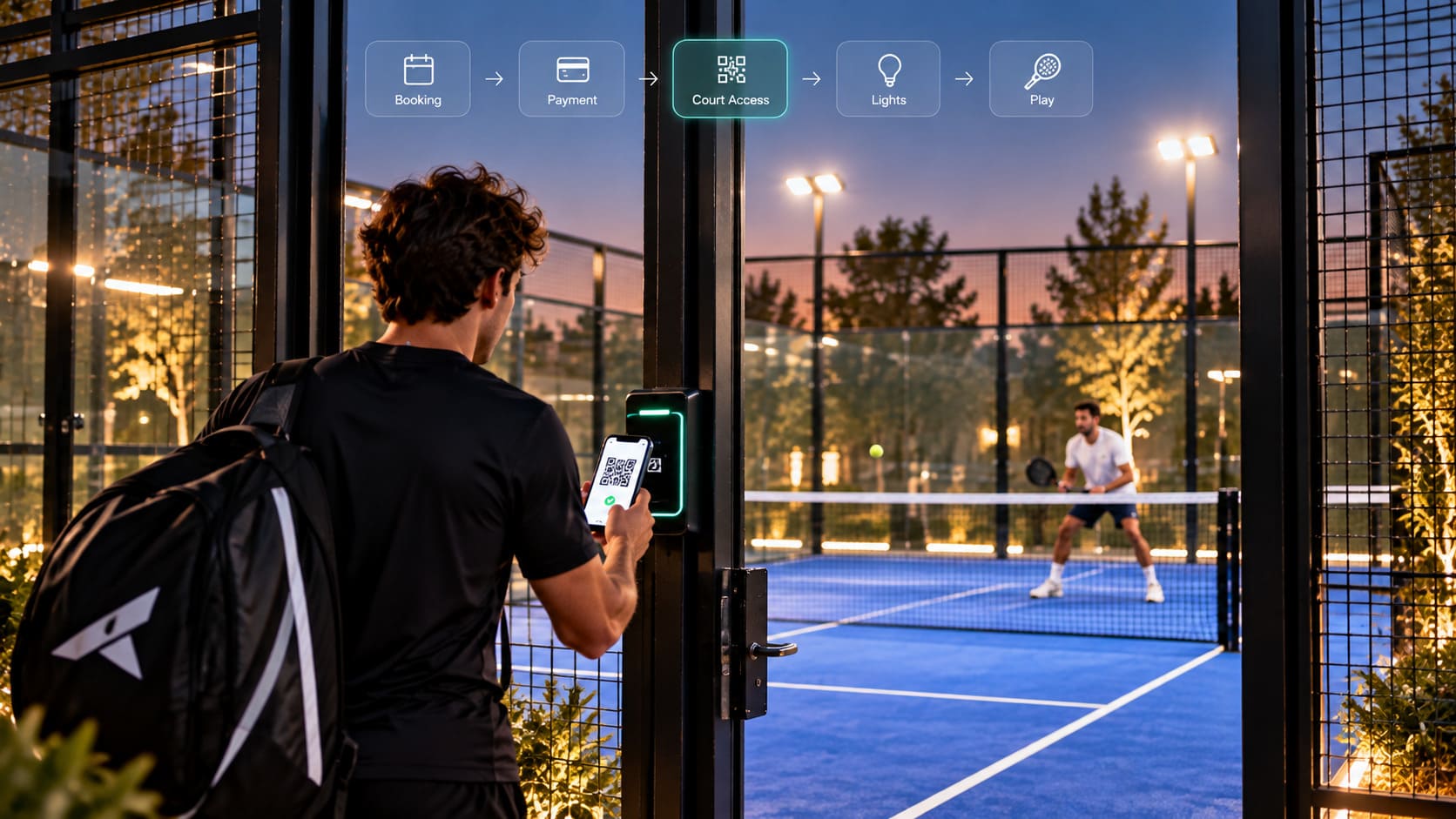
Book a court at 10 PM, pay directly from a smartphone, instantly receive digital access credentials, and enter the facility without ever stopping by the front desk. This frictionless experience is now a reality thanks to smart access control for padel clubs.
Yet behind a simple QR code scan or RFID badge tap lies a sophisticated technical ecosystem. To operate seamlessly, the system must determine:
Who booked, and whether the reservation is validated
When the player is allowed on-site, and exactly when their access expires
Which specific zones and doors they are permitted to unlock
Whether court lighting should be triggered, and what happens once the session ends
Access control shouldn't be treated as a standalone smart lock, but as an integral link connecting your booking platform, payment gateway, and club operations.
Here is a comprehensive breakdown of how this architecture works, which technologies to deploy, and key operational factors to consider before upgrading your sports facility.
Key Takeaways
One access event = an identity + a permission + a validity window.
Access rights are generated, rescheduled, or revoked automatically alongside the court booking.
QR codes for pay-and-play visitors; RFID cards or fobs for regular members.
Court lighting synchronizes with the club schedule to eliminate wasted energy.
Map your access zones and player journeys thoroughly before investing in hardware.
What Is Smart Access Control for Padel Clubs?
A connected access control system automatically grants or restricts entry to various zones across your sports complex. The operating principle boils down to a clear formula:
Identity + Permission + Validity Window = Authorized Access
In a padel club, permissions can depend on multiple criteria:
A confirmed booking or an active membership tier
User role (pay-and-play guest, member, coach, staff, maintenance…)
Time slot and facility zone
Payment validation status
The system does more than just verify who the player is: it determines exactly what that individual is authorized to access at that specific moment.
For instance, a premium member might have extended access to the clubhouse lounge, while an occasional guest can only enter the facility shortly before and after their scheduled match. This dynamic, rules-based logic is what sets connected access control apart from a basic electronic lock.
Related reading: Connected access control solutions for padel and tennis clubs
How Does the Complete Player Journey Work?
An optimal setup relies on an automated workflow bridging your club's booking schedule directly to physical site access. It operates in 7 key steps.

1. The Player Books a Court
The player checks live availability and selects their court, date, start time, and duration. The platform registers the reservation under their user account. At this stage, no permanent access needs to be provisioned.
2. The Booking Is Validated
Depending on your club’s booking policy, confirmation may require:
Full upfront payment or a deposit
A credit card pre-authorization
Redeeming prepaid court credits
Validation of an active membership plan
Once these conditions are fulfilled, the booking is flagged as confirmed. Integrating access control with your club's online payment system prevents unauthorized entry for bookings that fail to meet facility rules.
3. A Temporary Access Right Is Generated
The system now maps Player + Court + Date + Time Slot. It can instantly generate an access credential tailored precisely to that booking.
Example: Court 3 booked from 7:00 PM to 8:30 PM → Access window active from 6:50 PM to 8:40 PM.
The player can enter a few minutes early to warm up and exit comfortably after play, without ever receiving permanent or unmonitored facility access.
4. The Player Authenticates at the Gate
Based on your club’s hardware configuration, the user presents a dynamic QR code, a temporary PIN, an RFID card, a wristband, or uses their mobile app. The reader checks whether the credential matches an active permission: if verified, the entry unlocks; if not, it remains secured.
5. Access Is Restricted to Authorized Zones
Not every entry point in a sports complex should operate under the same rules. Your facility might include a perimeter gate, a clubhouse, locker rooms, multiple indoor/outdoor courts, a fitness studio, and back-office technical rooms.
A player can unlock the main gate, the locker rooms, and their assigned court, while remaining locked out of all other unauthorized areas.
6. Court Lighting Triggers Automatically
For outdoor courts or fully autonomous padel clubs, the schedule doubles as an automation trigger. Knowing the exact match start and finish times, the system switches court lights on right on schedule and powers them down when the court is vacated.
7. Access Automatically Expires
Once the post-match window closes, the temporary access credential is instantly deactivated by the system.
Booking → Validation → Access → Match play → Expiration: this end-to-end chain is what delivers true operational automation for sports clubs.
QR Codes, RFID, or PIN Codes: Which Technology Should You Choose?
There is no single one-size-fits-all credential. The right choice primarily depends on player visit frequency and your facility's operational model.

QR Codes: Ideal for Pay-and-Play and Occasional Guests
Players receive a dynamic QR code directly on their smartphone to scan at the gate. This is the gold standard for first-time visitors or non-members: zero physical card management required.
No physical media to purchase or distribute
Instant generation of time-limited access credentials
A 100% digital, modern customer experience
RFID Cards & Fobs: Fast and Seamless for Members
Regulars simply tap their card, key fob, or wristband against the reader. The reader identifies the user and verifies real-time permissions on the spot.
Instant, ultra-fast scanning
No need to pull out a smartphone
Reusable credentials that last across membership seasons
Good to know: Access rights aren't stored locally on the card itself. Your club management software makes the real-time decision the moment the card touches the reader.
Temporary PIN Codes: Simple, but Requires Strict Rules
The platform generates a unique numeric code that the player enters on an external keypad. It requires no physical card and no smartphone scan—making it convenient for one-off sessions.
Best practice: Passcodes are easily shared between players. Always enforce single-session, time-expiring PIN codes tied to verified bookings instead of generic master codes.
Which Credential Fits Which User Profile?
User Profile | Recommended Technology |
|---|---|
Occasional / Pay-and-Play | Dynamic QR Code or Single-Use PIN |
Club Member | RFID Card/Fob or Mobile App |
Coach / Pro | RFID or Controlled Scheduled Access |
Club Manager / Operator | Master / Extended Access |
External Contractor / Maintenance | Dedicated Time-Bound Credential |
Ultimately, the physical credential is just a key: the real power lies in the automation engine governing access permissions for each user profile.
How to Manage Multiple Zones in a Padel Club
Access control shouldn't function as a basic all-or-nothing switch. Picture a facility featuring a main gate, six courts, two changing rooms, a clubhouse, a gym, and a staff storage room: each user profile has distinct access requirements.

Occasional Player: Main gate, locker rooms, and their booked court only. Staff and fitness areas remain locked.
Premium Member: Main gate, locker rooms, booked court, plus fitness studio access included in their package.
Club Staff: Main gate, locker rooms, all courts, and internal offices based on their administrative role.
Configured this way, access control becomes a mission-critical tool for granular site management and asset protection.
How to Sync Access Control with Your Booking Calendar
This integration is the technological backbone of a modern facility. Your access control system must instantly register when a booking is created, rescheduled, extended, or canceled, requiring continuous, bi-directional communication with your calendar.
By using dedicated padel club management software, facility access is automatically paired with the live schedule:
Booking created → Corresponding access permission is provisioned.
Booking rescheduled → Access window updates automatically.
Booking canceled → Access permissions are immediately revoked.
Without real-time synchronization, staff are forced to manually update entry lists after every schedule adjustment, defeating the entire purpose of smart automation.
Automating Padel Court Lighting: Efficiency & Energy Savings
Manual lighting management frequently leads to operational waste and inflated utility bills:
Courts illuminated long before players arrive
Floodlights left burning after late-night sessions
Staff tied up manually flipping breaker switches
Empty courts illuminated due to no-shows
When linked to your booking software, smart relays trigger lighting based on real facility usage. A standard scenario looks like this:
6:55 PM: Court lighting turns on for warm-up
7:00 PM: Match session begins
8:30 PM: Match session ends
8:35 PM: Lights shut down automatically if no booking follows
Buffer times are fully customizable to your operations. The ROI is immediate: an elevated player experience combined with drastic reductions in unnecessary energy consumption.

What Happens with Back-to-Back Bookings?
If Player A reserves from 6:00 PM to 7:30 PM and Player B books from 7:30 PM to 9:00 PM, cutting the lights off only to restrike them immediately makes no sense. An intelligent controller maintains continuous lighting across sequential bookings.
Automation must look beyond individual slots: it must evaluate the entire day's court schedule holistically.
Can You Run an Unstaffed, Fully Autonomous Padel Club?
Yes, provided you simultaneously orchestrate several core operational functions:
Self-service booking: Players select courts and times autonomously via app or web.
Automated payments: Transactions clear online without front-desk intervention.
Digital access: Players receive digital entry passes straight to their phones.
Zone segmentation: Hardware permits access only to designated spaces.
Smart lighting: Floodlights activate and deactivate strictly per bookings.
Remote support: A clear protocol handles exceptions or assistance requests.
The challenge isn’t simply bolting a smart lock onto a gate—it’s architecting a seamless, automated end-to-end customer journey.
Related reading: How to operate a fully autonomous padel club
What Hardware Is Required for Automated Access Control?
Hardware specifications depend heavily on site infrastructure and your automation goals. A typical rollout includes:
Identification: Barcode/QR readers, RFID card readers, heavy-duty outdoor keypads
Locking Mechanisms: Electric strikes, magnetic shear locks, motorized gate actuators
Controllers: IP access control units, automated lighting relays
Infrastructure: Structured network cabling, PoE switches, uninterruptible power supplies (UPS)
Never start an access project by asking 'Which lock should we buy?'. Start with 'Which player journey and facility zones do we need to automate?'. Hardware decisions should always follow your operational design.
Hardwired, Wi-Fi, or 4G/5G: Which Connectivity Should You Choose?
Some clubs enjoy robust Ethernet backbones or high-density commercial Wi-Fi, while others have outdoor courts located far from the main pavilion. Relying exclusively on consumer-grade Wi-Fi for remote access gates introduces serious operational vulnerabilities. For peripheral gates, consider industrial cellular (4G/5G) gateways paired with battery or solar-backed power systems.
Before deployment, audit the following:
Network coverage across all court boundaries
Dedicated power supplies at each gate or entry point
Physical cable distances between controllers and locks
Network uptime and failover capability
Backup protocols in the event of an outage
What Happens During a Power or Internet Outage?
Disaster recovery must be planned from day one. Depending on your installation, several fail-safe measures can be deployed: battery backups (UPS), standalone offline access caches, mechanical key overrides, remote mobile unlocks, and emergency support procedures.
Operational requirements differ between a perimeter vehicle gate, a clubhouse door, and emergency fire exits. One principle is non-negotiable: access automation must never compromise building life-safety or fire egress codes.
Early Arrivals, Delays, and Cancellations: How Does the System Respond?
Dynamic access buffers handle day-to-day scheduling realities smoothly without requiring manager intervention.

What If a Player Arrives Early?
For a 7:00 PM to 8:30 PM court session, you might set the entry window to activate at 6:50 PM. A player scanning in at 6:30 PM will be denied; at 6:52 PM, the gate unlocks. Operators define the buffer that best suits their club traffic, preventing unauthorized early loitering.
What If a Player Arrives Late?
As long as the active session window has not elapsed, access remains valid: a player showing up at 7:15 PM for their 7:00 PM session can still enter without friction. The system applies club policies automatically without punishing paying customers.
What Happens When a Booking Is Canceled?
The rule is instant and clear: booking canceled = access revoked. The QR code or temporary pass tied to that reservation is immediately invalidated, eliminating security loopholes caused by outdated schedules.
Can You Automate Just Part of Your Sports Club?
Absolutely. A club doesn't need to transition to 100% autonomous operations overnight. Many operators opt for a hybrid model: full front-desk staff from 9:00 AM to 8:00 PM, shifting to autonomous access for early mornings (7:00 AM – 9:00 AM) and late evenings (8:00 PM – 11:00 PM).
This hybrid approach lets you extend revenue-generating hours without dramatically increasing labor costs. You can also automate outdoor courts first before tackling indoor clubhouse entries.
What Are the Business and Operational Benefits for Clubs?
Connected access control removes the manual burden of repetitive operational tasks: opening security gates, verifying reservations, issuing physical keys, turning on floodlights, and closing down courts at night.
Your team can reinvest those hours where they drive real revenue: member onboarding, community events, pro shop merchandising, coaching programs, and hospitality.
The goal is not to eliminate human hospitality, but to reallocate your staff’s time to high-value interactions that boost retention and spend.
The Risks of a Poor Access Control Implementation
A poorly architected system creates more friction than it solves. Here are 6 common pitfalls club managers should avoid:
Siloed software: Disconnected booking and access tools force your staff into tedious, error-prone manual data entry.
Static, permanent PIN codes: Master codes shared with members inevitably leak to unauthorized non-paying players.
Overly broad permissions: Granting site-wide access when a user only booked a single court increases security risks.
Fragile connectivity: Facilities that lock up completely the moment the local Wi-Fi drops create instant operational crises.
No emergency overrides: Even the most automated facility must have clear manual fallbacks for unexpected failures.
Incomplete site mapping: Automating a court door while leaving side gates unmonitored renders the entire security perimeter ineffective.
Security & Access Control: Essential Questions to Ask Before Deployment
Before committing to hardware purchases, conduct a thorough site audit. For every access door and gate, answer these 8 operational questions:
Who needs access through this checkpoint?
During which exact timeframes?
What is the optimal credential type (QR, RFID, app)?
Which internal zones should be accessible from here?
What happens when the user's validity window expires?
What is the fail-safe protocol during a power or network cut?
Does local fire code require a mechanical emergency egress?
Does this specific zone require synchronized lighting relays?
Addressing these points upfront ensures a scalable, high-performance architecture.
Sample Architecture: A 6-Court Padel Facility
Consider a typical facility equipped with an automated perimeter gate, six courts, two changing rooms, a clubhouse lounge, and a staff equipment room.
Player Workflow
Player books Court 4 for 8:00 PM and completes online payment.
The booking engine instantly provisions a temporary access pass.
The player arrives 10 minutes prior and scans through the perimeter gate.
The player unlocks the locker room, then enters Court 4.
Court 4 floodlights turn on automatically based on the schedule.
Following their match, the player's access pass expires automatically.
Staff Workflow
Club staff hold dedicated RFID credentials granting continuous access to all areas, dynamically scheduled around their work shifts.
Third-Party Contractor Workflow
An external maintenance technician visiting on Tuesday morning receives a unique access pass valid strictly on Tuesday from 9:00 AM to 12:00 PM, granting entry solely to the perimeter gate and the technical room.
This granular approach provides infinitely better security than a shared master keypad code.
Standalone Access Control vs. All-in-One Club Management Software
You could technically assemble an ad-hoc tech stack combining independent tools for scheduling, payments, access control, and smart lighting. However, multiplying disjointed vendors turns data sync into a constant operational bottleneck:
Bookings must verify real-time payment status
Access gates must continuously sync with the booking ledger
Smart lighting relays must poll the court calendar
Executive reporting must consolidate metrics from every touchpoint
Deploying an integrated padel club management platform eliminates friction between these modules and automates your day-to-day operations seamlessly.
12 Questions to Ask Vendors Before Choosing an Access Solution
Before signing with a vendor, evaluate their capabilities using this operational checklist. It will help you assess real-world business performance rather than just hardware specs.
Does the solution natively integrate with my court booking schedule?
How are canceled reservations handled in real time?
Can I generate dynamic, time-limited access credentials?
Does the system support mobile dynamic QR codes?
Does it support contactless RFID cards and wristbands?
Can I easily configure multi-zone permissions across my facility?
Can I customize rights for members, guests, coaches, and staff?
Does the system automate court lighting relays?
How does the hardware handle local internet or power dropouts?
What manual fail-safe procedures are supported?
Can managers trigger emergency unlocks remotely via app?
Is the architecture scalable if we add more courts or locations?
Padel Club Access Control: Frequently Asked Questions
How does smart access control work for a padel court?
The system checks whether a user holds valid permissions—typically linked to a confirmed booking, membership, or administrative role. The player scans a QR code, badge, PIN, or mobile app, and the entry latch triggers only when all reservation criteria are met.
Can QR codes be automatically issued after booking?
Yes. A dynamic, encrypted QR code is instantly delivered upon booking confirmation, configured to work only within a designated time window around the reserved session.
What is the operational difference between QR codes and RFID?
QR codes are optimal for casual, pay-and-play players because they eliminate the cost and hassle of issuing physical cards. RFID cards or fobs are better suited for regular members, staff, and resident coaches who want instant tap-and-go convenience.
Can padel court floodlights be automated?
Yes. By integrating access controllers or IoT smart relays with your court booking software, court lighting triggers on and off in lockstep with the daily reservation schedule.
Can we manage segmented facility zones independently?
Yes. Gates, locker rooms, padel courts, and back-office areas can each have distinct, customizable security policies tailored to specific user tiers.
Can a padel facility operate completely unstaffed?
Yes, the core user flow—booking, payment, entry, and lighting—can be 100% automated. However, operators must maintain clear procedures for cleaning, routine facility maintenance, security surveillance, and emergency guest support.
What happens to gate access if a player cancels?
In a fully synchronized software ecosystem, canceling a reservation instantly revokes the associated access credentials, barring entry at the gate.
Does connected access control work without Wi-Fi?
Yes, depending on your hardware architecture. Commercial-grade systems can utilize hardwired Ethernet, industrial cellular (4G/5G) connections, and onboard controller memory to validate users even if local internet drops.
How much does an access control installation cost for a padel club?
Pricing varies depending on door counts, chosen readers, electrified locking hardware, electrical infrastructure, network deployment, and lighting relays. A preliminary site survey is the best way to get an accurate project quote.
Can access control be retrofitted into an existing club?
Yes, modern solutions can easily be retrofitted onto existing gates, glass court doors, and clubhouse entries, provided electrical and cabling requirements are accommodated.
Conclusion: Access Control Is an Ecosystem, Not Just a Lock
Automating access for your padel club isn’t about mounting a standalone QR scanner on a door. High-performing facilities rely on a connected, cohesive operational chain:
Online court booking
Automated payment validation
Instant credential provisioning
Frictionless player authentication
Selective zone access
Automated court lighting
Automatic credential expiration
The more seamlessly these operations communicate, the less manual work your team has to handle: access control becomes a core growth driver in your club management strategy.
Looking to automate your sports facility and optimize operations? Book a live demo with Doinsport →
Book a court at 10 PM, pay directly from a smartphone, instantly receive digital access credentials, and enter the facility without ever stopping by the front desk. This frictionless experience is now a reality thanks to smart access control for padel clubs.
Yet behind a simple QR code scan or RFID badge tap lies a sophisticated technical ecosystem. To operate seamlessly, the system must determine:
Who booked, and whether the reservation is validated
When the player is allowed on-site, and exactly when their access expires
Which specific zones and doors they are permitted to unlock
Whether court lighting should be triggered, and what happens once the session ends
Access control shouldn't be treated as a standalone smart lock, but as an integral link connecting your booking platform, payment gateway, and club operations.
Here is a comprehensive breakdown of how this architecture works, which technologies to deploy, and key operational factors to consider before upgrading your sports facility.
Key Takeaways
One access event = an identity + a permission + a validity window.
Access rights are generated, rescheduled, or revoked automatically alongside the court booking.
QR codes for pay-and-play visitors; RFID cards or fobs for regular members.
Court lighting synchronizes with the club schedule to eliminate wasted energy.
Map your access zones and player journeys thoroughly before investing in hardware.
What Is Smart Access Control for Padel Clubs?
A connected access control system automatically grants or restricts entry to various zones across your sports complex. The operating principle boils down to a clear formula:
Identity + Permission + Validity Window = Authorized Access
In a padel club, permissions can depend on multiple criteria:
A confirmed booking or an active membership tier
User role (pay-and-play guest, member, coach, staff, maintenance…)
Time slot and facility zone
Payment validation status
The system does more than just verify who the player is: it determines exactly what that individual is authorized to access at that specific moment.
For instance, a premium member might have extended access to the clubhouse lounge, while an occasional guest can only enter the facility shortly before and after their scheduled match. This dynamic, rules-based logic is what sets connected access control apart from a basic electronic lock.
Related reading: Connected access control solutions for padel and tennis clubs
How Does the Complete Player Journey Work?
An optimal setup relies on an automated workflow bridging your club's booking schedule directly to physical site access. It operates in 7 key steps.
1. The Player Books a Court
The player checks live availability and selects their court, date, start time, and duration. The platform registers the reservation under their user account. At this stage, no permanent access needs to be provisioned.
2. The Booking Is Validated
Depending on your club’s booking policy, confirmation may require:
Full upfront payment or a deposit
A credit card pre-authorization
Redeeming prepaid court credits
Validation of an active membership plan
Once these conditions are fulfilled, the booking is flagged as confirmed. Integrating access control with your club's online payment system prevents unauthorized entry for bookings that fail to meet facility rules.
3. A Temporary Access Right Is Generated
The system now maps Player + Court + Date + Time Slot. It can instantly generate an access credential tailored precisely to that booking.
Example: Court 3 booked from 7:00 PM to 8:30 PM → Access window active from 6:50 PM to 8:40 PM.
The player can enter a few minutes early to warm up and exit comfortably after play, without ever receiving permanent or unmonitored facility access.
4. The Player Authenticates at the Gate
Based on your club’s hardware configuration, the user presents a dynamic QR code, a temporary PIN, an RFID card, a wristband, or uses their mobile app. The reader checks whether the credential matches an active permission: if verified, the entry unlocks; if not, it remains secured.
5. Access Is Restricted to Authorized Zones
Not every entry point in a sports complex should operate under the same rules. Your facility might include a perimeter gate, a clubhouse, locker rooms, multiple indoor/outdoor courts, a fitness studio, and back-office technical rooms.
A player can unlock the main gate, the locker rooms, and their assigned court, while remaining locked out of all other unauthorized areas.
6. Court Lighting Triggers Automatically
For outdoor courts or fully autonomous padel clubs, the schedule doubles as an automation trigger. Knowing the exact match start and finish times, the system switches court lights on right on schedule and powers them down when the court is vacated.
7. Access Automatically Expires
Once the post-match window closes, the temporary access credential is instantly deactivated by the system.
Booking → Validation → Access → Match play → Expiration: this end-to-end chain is what delivers true operational automation for sports clubs.
QR Codes, RFID, or PIN Codes: Which Technology Should You Choose?
There is no single one-size-fits-all credential. The right choice primarily depends on player visit frequency and your facility's operational model.
QR Codes: Ideal for Pay-and-Play and Occasional Guests
Players receive a dynamic QR code directly on their smartphone to scan at the gate. This is the gold standard for first-time visitors or non-members: zero physical card management required.
No physical media to purchase or distribute
Instant generation of time-limited access credentials
A 100% digital, modern customer experience
RFID Cards & Fobs: Fast and Seamless for Members
Regulars simply tap their card, key fob, or wristband against the reader. The reader identifies the user and verifies real-time permissions on the spot.
Instant, ultra-fast scanning
No need to pull out a smartphone
Reusable credentials that last across membership seasons
Good to know: Access rights aren't stored locally on the card itself. Your club management software makes the real-time decision the moment the card touches the reader.
Temporary PIN Codes: Simple, but Requires Strict Rules
The platform generates a unique numeric code that the player enters on an external keypad. It requires no physical card and no smartphone scan—making it convenient for one-off sessions.
Best practice: Passcodes are easily shared between players. Always enforce single-session, time-expiring PIN codes tied to verified bookings instead of generic master codes.
Which Credential Fits Which User Profile?
User Profile | Recommended Technology |
|---|---|
Occasional / Pay-and-Play | Dynamic QR Code or Single-Use PIN |
Club Member | RFID Card/Fob or Mobile App |
Coach / Pro | RFID or Controlled Scheduled Access |
Club Manager / Operator | Master / Extended Access |
External Contractor / Maintenance | Dedicated Time-Bound Credential |
Ultimately, the physical credential is just a key: the real power lies in the automation engine governing access permissions for each user profile.
How to Manage Multiple Zones in a Padel Club
Access control shouldn't function as a basic all-or-nothing switch. Picture a facility featuring a main gate, six courts, two changing rooms, a clubhouse, a gym, and a staff storage room: each user profile has distinct access requirements.
Occasional Player: Main gate, locker rooms, and their booked court only. Staff and fitness areas remain locked.
Premium Member: Main gate, locker rooms, booked court, plus fitness studio access included in their package.
Club Staff: Main gate, locker rooms, all courts, and internal offices based on their administrative role.
Configured this way, access control becomes a mission-critical tool for granular site management and asset protection.
How to Sync Access Control with Your Booking Calendar
This integration is the technological backbone of a modern facility. Your access control system must instantly register when a booking is created, rescheduled, extended, or canceled, requiring continuous, bi-directional communication with your calendar.
By using dedicated padel club management software, facility access is automatically paired with the live schedule:
Booking created → Corresponding access permission is provisioned.
Booking rescheduled → Access window updates automatically.
Booking canceled → Access permissions are immediately revoked.
Without real-time synchronization, staff are forced to manually update entry lists after every schedule adjustment, defeating the entire purpose of smart automation.
Automating Padel Court Lighting: Efficiency & Energy Savings
Manual lighting management frequently leads to operational waste and inflated utility bills:
Courts illuminated long before players arrive
Floodlights left burning after late-night sessions
Staff tied up manually flipping breaker switches
Empty courts illuminated due to no-shows
When linked to your booking software, smart relays trigger lighting based on real facility usage. A standard scenario looks like this:
6:55 PM: Court lighting turns on for warm-up
7:00 PM: Match session begins
8:30 PM: Match session ends
8:35 PM: Lights shut down automatically if no booking follows
Buffer times are fully customizable to your operations. The ROI is immediate: an elevated player experience combined with drastic reductions in unnecessary energy consumption.
What Happens with Back-to-Back Bookings?
If Player A reserves from 6:00 PM to 7:30 PM and Player B books from 7:30 PM to 9:00 PM, cutting the lights off only to restrike them immediately makes no sense. An intelligent controller maintains continuous lighting across sequential bookings.
Automation must look beyond individual slots: it must evaluate the entire day's court schedule holistically.
Can You Run an Unstaffed, Fully Autonomous Padel Club?
Yes, provided you simultaneously orchestrate several core operational functions:
Self-service booking: Players select courts and times autonomously via app or web.
Automated payments: Transactions clear online without front-desk intervention.
Digital access: Players receive digital entry passes straight to their phones.
Zone segmentation: Hardware permits access only to designated spaces.
Smart lighting: Floodlights activate and deactivate strictly per bookings.
Remote support: A clear protocol handles exceptions or assistance requests.
The challenge isn’t simply bolting a smart lock onto a gate—it’s architecting a seamless, automated end-to-end customer journey.
Related reading: How to operate a fully autonomous padel club
What Hardware Is Required for Automated Access Control?
Hardware specifications depend heavily on site infrastructure and your automation goals. A typical rollout includes:
Identification: Barcode/QR readers, RFID card readers, heavy-duty outdoor keypads
Locking Mechanisms: Electric strikes, magnetic shear locks, motorized gate actuators
Controllers: IP access control units, automated lighting relays
Infrastructure: Structured network cabling, PoE switches, uninterruptible power supplies (UPS)
Never start an access project by asking 'Which lock should we buy?'. Start with 'Which player journey and facility zones do we need to automate?'. Hardware decisions should always follow your operational design.
Hardwired, Wi-Fi, or 4G/5G: Which Connectivity Should You Choose?
Some clubs enjoy robust Ethernet backbones or high-density commercial Wi-Fi, while others have outdoor courts located far from the main pavilion. Relying exclusively on consumer-grade Wi-Fi for remote access gates introduces serious operational vulnerabilities. For peripheral gates, consider industrial cellular (4G/5G) gateways paired with battery or solar-backed power systems.
Before deployment, audit the following:
Network coverage across all court boundaries
Dedicated power supplies at each gate or entry point
Physical cable distances between controllers and locks
Network uptime and failover capability
Backup protocols in the event of an outage
What Happens During a Power or Internet Outage?
Disaster recovery must be planned from day one. Depending on your installation, several fail-safe measures can be deployed: battery backups (UPS), standalone offline access caches, mechanical key overrides, remote mobile unlocks, and emergency support procedures.
Operational requirements differ between a perimeter vehicle gate, a clubhouse door, and emergency fire exits. One principle is non-negotiable: access automation must never compromise building life-safety or fire egress codes.
Early Arrivals, Delays, and Cancellations: How Does the System Respond?
Dynamic access buffers handle day-to-day scheduling realities smoothly without requiring manager intervention.
What If a Player Arrives Early?
For a 7:00 PM to 8:30 PM court session, you might set the entry window to activate at 6:50 PM. A player scanning in at 6:30 PM will be denied; at 6:52 PM, the gate unlocks. Operators define the buffer that best suits their club traffic, preventing unauthorized early loitering.
What If a Player Arrives Late?
As long as the active session window has not elapsed, access remains valid: a player showing up at 7:15 PM for their 7:00 PM session can still enter without friction. The system applies club policies automatically without punishing paying customers.
What Happens When a Booking Is Canceled?
The rule is instant and clear: booking canceled = access revoked. The QR code or temporary pass tied to that reservation is immediately invalidated, eliminating security loopholes caused by outdated schedules.
Can You Automate Just Part of Your Sports Club?
Absolutely. A club doesn't need to transition to 100% autonomous operations overnight. Many operators opt for a hybrid model: full front-desk staff from 9:00 AM to 8:00 PM, shifting to autonomous access for early mornings (7:00 AM – 9:00 AM) and late evenings (8:00 PM – 11:00 PM).
This hybrid approach lets you extend revenue-generating hours without dramatically increasing labor costs. You can also automate outdoor courts first before tackling indoor clubhouse entries.
What Are the Business and Operational Benefits for Clubs?
Connected access control removes the manual burden of repetitive operational tasks: opening security gates, verifying reservations, issuing physical keys, turning on floodlights, and closing down courts at night.
Your team can reinvest those hours where they drive real revenue: member onboarding, community events, pro shop merchandising, coaching programs, and hospitality.
The goal is not to eliminate human hospitality, but to reallocate your staff’s time to high-value interactions that boost retention and spend.
The Risks of a Poor Access Control Implementation
A poorly architected system creates more friction than it solves. Here are 6 common pitfalls club managers should avoid:
Siloed software: Disconnected booking and access tools force your staff into tedious, error-prone manual data entry.
Static, permanent PIN codes: Master codes shared with members inevitably leak to unauthorized non-paying players.
Overly broad permissions: Granting site-wide access when a user only booked a single court increases security risks.
Fragile connectivity: Facilities that lock up completely the moment the local Wi-Fi drops create instant operational crises.
No emergency overrides: Even the most automated facility must have clear manual fallbacks for unexpected failures.
Incomplete site mapping: Automating a court door while leaving side gates unmonitored renders the entire security perimeter ineffective.
Security & Access Control: Essential Questions to Ask Before Deployment
Before committing to hardware purchases, conduct a thorough site audit. For every access door and gate, answer these 8 operational questions:
Who needs access through this checkpoint?
During which exact timeframes?
What is the optimal credential type (QR, RFID, app)?
Which internal zones should be accessible from here?
What happens when the user's validity window expires?
What is the fail-safe protocol during a power or network cut?
Does local fire code require a mechanical emergency egress?
Does this specific zone require synchronized lighting relays?
Addressing these points upfront ensures a scalable, high-performance architecture.
Sample Architecture: A 6-Court Padel Facility
Consider a typical facility equipped with an automated perimeter gate, six courts, two changing rooms, a clubhouse lounge, and a staff equipment room.
Player Workflow
Player books Court 4 for 8:00 PM and completes online payment.
The booking engine instantly provisions a temporary access pass.
The player arrives 10 minutes prior and scans through the perimeter gate.
The player unlocks the locker room, then enters Court 4.
Court 4 floodlights turn on automatically based on the schedule.
Following their match, the player's access pass expires automatically.
Staff Workflow
Club staff hold dedicated RFID credentials granting continuous access to all areas, dynamically scheduled around their work shifts.
Third-Party Contractor Workflow
An external maintenance technician visiting on Tuesday morning receives a unique access pass valid strictly on Tuesday from 9:00 AM to 12:00 PM, granting entry solely to the perimeter gate and the technical room.
This granular approach provides infinitely better security than a shared master keypad code.
Standalone Access Control vs. All-in-One Club Management Software
You could technically assemble an ad-hoc tech stack combining independent tools for scheduling, payments, access control, and smart lighting. However, multiplying disjointed vendors turns data sync into a constant operational bottleneck:
Bookings must verify real-time payment status
Access gates must continuously sync with the booking ledger
Smart lighting relays must poll the court calendar
Executive reporting must consolidate metrics from every touchpoint
Deploying an integrated padel club management platform eliminates friction between these modules and automates your day-to-day operations seamlessly.
12 Questions to Ask Vendors Before Choosing an Access Solution
Before signing with a vendor, evaluate their capabilities using this operational checklist. It will help you assess real-world business performance rather than just hardware specs.
Does the solution natively integrate with my court booking schedule?
How are canceled reservations handled in real time?
Can I generate dynamic, time-limited access credentials?
Does the system support mobile dynamic QR codes?
Does it support contactless RFID cards and wristbands?
Can I easily configure multi-zone permissions across my facility?
Can I customize rights for members, guests, coaches, and staff?
Does the system automate court lighting relays?
How does the hardware handle local internet or power dropouts?
What manual fail-safe procedures are supported?
Can managers trigger emergency unlocks remotely via app?
Is the architecture scalable if we add more courts or locations?
Padel Club Access Control: Frequently Asked Questions
How does smart access control work for a padel court?
The system checks whether a user holds valid permissions—typically linked to a confirmed booking, membership, or administrative role. The player scans a QR code, badge, PIN, or mobile app, and the entry latch triggers only when all reservation criteria are met.
Can QR codes be automatically issued after booking?
Yes. A dynamic, encrypted QR code is instantly delivered upon booking confirmation, configured to work only within a designated time window around the reserved session.
What is the operational difference between QR codes and RFID?
QR codes are optimal for casual, pay-and-play players because they eliminate the cost and hassle of issuing physical cards. RFID cards or fobs are better suited for regular members, staff, and resident coaches who want instant tap-and-go convenience.
Can padel court floodlights be automated?
Yes. By integrating access controllers or IoT smart relays with your court booking software, court lighting triggers on and off in lockstep with the daily reservation schedule.
Can we manage segmented facility zones independently?
Yes. Gates, locker rooms, padel courts, and back-office areas can each have distinct, customizable security policies tailored to specific user tiers.
Can a padel facility operate completely unstaffed?
Yes, the core user flow—booking, payment, entry, and lighting—can be 100% automated. However, operators must maintain clear procedures for cleaning, routine facility maintenance, security surveillance, and emergency guest support.
What happens to gate access if a player cancels?
In a fully synchronized software ecosystem, canceling a reservation instantly revokes the associated access credentials, barring entry at the gate.
Does connected access control work without Wi-Fi?
Yes, depending on your hardware architecture. Commercial-grade systems can utilize hardwired Ethernet, industrial cellular (4G/5G) connections, and onboard controller memory to validate users even if local internet drops.
How much does an access control installation cost for a padel club?
Pricing varies depending on door counts, chosen readers, electrified locking hardware, electrical infrastructure, network deployment, and lighting relays. A preliminary site survey is the best way to get an accurate project quote.
Can access control be retrofitted into an existing club?
Yes, modern solutions can easily be retrofitted onto existing gates, glass court doors, and clubhouse entries, provided electrical and cabling requirements are accommodated.
Conclusion: Access Control Is an Ecosystem, Not Just a Lock
Automating access for your padel club isn’t about mounting a standalone QR scanner on a door. High-performing facilities rely on a connected, cohesive operational chain:
Online court booking
Automated payment validation
Instant credential provisioning
Frictionless player authentication
Selective zone access
Automated court lighting
Automatic credential expiration
The more seamlessly these operations communicate, the less manual work your team has to handle: access control becomes a core growth driver in your club management strategy.
Looking to automate your sports facility and optimize operations? Book a live demo with Doinsport →
Similar articles
Nov 18, 2026
Permits, financing, construction, software, pre-sales: a month-by-month reverse schedule for a padel club project, with the lead times to plan for.

Oct 28, 2026
Unlimited off-peak, discount memberships, packs and wallets: the membership plans padel clubs offer in 2026, their prices and how to set yours.

Oct 22, 2026
How much should you charge per hour for padel? 2026 market rates, peak vs. off-peak pricing, and memberships: the complete guide to setting your club's rates.

See Doinsport in action
Ready to grow your padel or tennis club?
Join over 1,000 clubs that run on Doinsport. Book a free demo and see what it can do for your club.
We're here to help.


See Doinsport in action
Ready to grow your padel or tennis club?
Join over 1,000 clubs that run on Doinsport. Book a free demo and see what it can do for your club.
See Doinsport in action
Ready to grow your padel or tennis club?
Join over 1,000 clubs that run on Doinsport. Book a free demo and see what it can do for your club.
We're here to help.